During my research I was viewing a video tutorial on YouTube on how to create a Final Fantasy turn based combat system.
Due to the up loader deactivating his account, this has dramatically set me back as I was following his tutorials to the near end of my work. Starting from fresh following other tutorials on YouTube has become such a struggle.
After finding other sites I was even tempted to buy a script for my combat system due to the stress of being behind and added pressure of making a great game. As this is a joint project with my class mate I do not want to let him down but due to the complex detail of code required for the combat system me adn my partner require is asking for to much for a coder of my skill level.
Creating my combat system will require advance training in #C (pronounced C sharp) ,JAVA script, GUI's and even Animation.
Studying #C and JAVA script in such short space of time is already adding pressure but after studying other turn based systems I could simplify my game without animations and only using variables and if statements. This will be quicker to do but will not look as me and my partner had planned, But due to the lack of tutorials and experience in code I am creating something to advance for my own skill level but I will still attempt to create a turn based combat system.
Here is some examples of JAVA script for my combat system.
- var turn : int = 1;
- var phase : int = 0;
- var enemyToAttack : String;
- //player stats
- var playerCurHp : float = 100.0;
- var playerMaxHp : float = 100.0;
- var playerMinAttack : float = 5.0;
- var playerMaxAttack : float = 10.0;
- var enemyTurnActivated : boolean = false;
- function Start () {
- }
- function OnGUI () {
- var otherScript: MainGame1 = gameObject.Find("MainGame").GetComponent(MainGame1);
- if(otherScript.inBattle == true) {
- // If it's the players turn then show combat buttons
- if(turn == 1) {
- //select attack
- if(phase == 0) {
- if (GUI.Button (Rect (Screen.width / 2 - 600,Screen.height / 2 + 200,140,20), "Attack")) {
- phase = 1;
- }
- if (GUI.Button (Rect (Screen.width / 2 - 600,Screen.height / 2 +225,140,20), "Item")) {
- phase = 2;
- }
- if (GUI.Button (Rect (Screen.width / 2 - 600,Screen.height / 2 + 250,140,20), "Run")) {
- phase = 3;
- }
- }
- //attack selection
- if(phase == 1) {
- if (GUI.Button (Rect (Screen.width / 2 - 600,Screen.height / 2 + 200,140,20), "Slice")) {
- turn = 2;
- phase = 0;
- }
- if (GUI.Button (Rect (Screen.width / 2 - 600,Screen.height / 2 +225,140,20), "Back")) {
- phase = 0;
- }
- }
- if(phase == 2) {
- if (GUI.Button (Rect (Screen.width / 2 - 600,Screen.height / 2 + 200,140,20), "Health Potion")) {
- turn = 2;
- phase = 0;
- }
- if (GUI.Button (Rect (Screen.width / 2 - 600,Screen.height / 2 +225,140,20), "Back")) {
- phase = 0;
- }
- }
- if(phase == 3) {
- if (GUI.Button (Rect (Screen.width / 2 - 600,Screen.height / 2 + 200,140,20), "Run Away")) {
- phase = 0;
- otherScript.inBattle = false;
- }
- if (GUI.Button (Rect (Screen.width / 2 - 600,Screen.height / 2 +225,140,20), "Back")) {
- phase = 0;
- }
- }
- }
- }
- }
- function Update () {
- //enemies turn
- if(turn == 2 && enemyTurnActivated == false) {
- enemyTurnActivated = true;
- enemyTurn();
- }
- }
- //After the player attacks then it's the enemy attack phase
- function enemyTurn () {
- Debug.Log("enemy 1 turn began");
- Debug.Log("enemy 1 attacked");
- enemyTurnActivated = false;
- turn = 1;
}
This is my combat system using JAVA script in Unity4.
Here is some screenshots of my GUI for my combat system created in Photoshop CS6 and how I created them.

This will be the player HUD displaying the characters name, HP, MP and also the ATB bar ( Active Time Bar).

When the ATB bar fills up to the top this will be displayed for the playable character to select his next move, either being Attack, cast a spell using Magic, or selecting an item in the Items menu such as potions or poisons.

After the Magic has been selected the character will perform a magical attack called Wind Strike. This will inflict elemental damage to the monster dealing more damage or less damage depending on the monsters weakness or strength level. If the monster was a lighting type then the move lightning would be pointless using
against it as the monster would absorb your attack, so using your basic attack would be more useful than always relying on your magic abilities.

Lastly is the HUD that is displayed. When a move is being casted or used by either player or enemy the box will appear on the top of the screen in a transparent window to still be able to see the background and not block out the landscape. The window will vanish after 3 seconds of the move being casted after the turn is ended.
I will now explain how I created these in Photoshop using screenshots, there will be a KEY which I added in the left corner of the screen in some screen shots indicating what some icons mean.


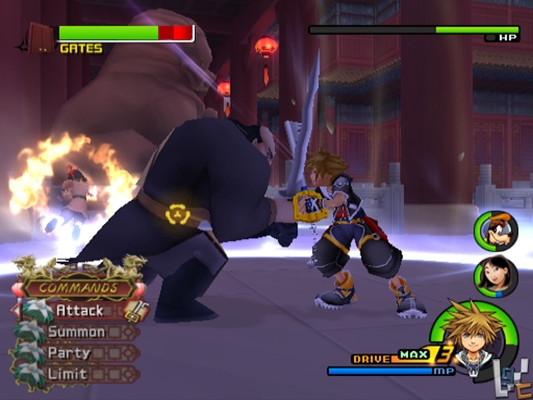
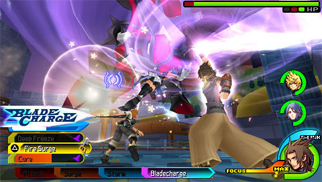
For influences of a turn based combat system I used a reference from Final Fantasy, Kingdom Hearts and Dragon Quest.
Dragon Quest


Final Fantasy


Kingdom Hearts

I admire

No comments:
Post a Comment